|
The playback dialog lets you determine some of the interpretation of your score while playing.
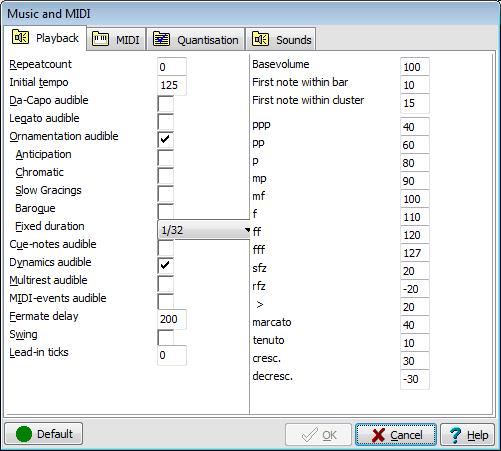
You can affect playback with a bunch of switches that will alter the resulting notes:
|
Da-Capo audible |
Effectuate/ignore da-capo-like constructions |
|
Legato audible |
Without legato switched on, all notes will be switched off before the next note starts. |
|
Ornamentation audible |
Disable audible ornamentation completely, play ornaments/embellishments using anticipation, chromatically/diatonically, slow , baroque or fixed timing. |
|
Cue notes audible |
Play or ignore cue-size notes. |
|
Dynamics audible |
Use dynamic levels when marked |
|
Multi-rest audible |
Effectuate multi-bar rests. Can be switched off to ease listening to solo parts containing long multirests |
|
MIDI events audible |
Effectuate in-line MIDI-events like instrument changes |
|
Fermate delay |
Percentage delay to insert when a fermate sign is found. 100 means no delay |
|
Swing |
Use swing-timing when appropriate |
|
Lead-in ticks |
Emit a number of lead-in ticks for use in play-along |
Default accents will be on the first beat within a bar as well as first notes of every cluster, unless you specify 0 for First note within bar and First note within cluster.
How loud or soft the effect of a dynamics marker will be is something you can define here. ppp to fff are the resulting MIDI-volumes (between 0 and 127) the remaining options are dynamic changes.